
Why True Accessibility Requires More Than a Passing Score
If you are building a digital product, you likely want to know if it is accessible. You might look at a passing score on a dashboard and assume the job is done.
But here is the reality: automated accessibility testing catches roughly 30% of issues at best.
While these tools are essential for establishing a baseline, they are only the starting point. For business leaders and product owners, understanding what these tools find - and critically, what they miss - is the difference between a site that is technically "compliant" and one that is genuinely usable for your customers.
Below we outline the tooling ecosystem we use to protect your digital presence, from individual component checks to full-system automated pipelines, and explain why the human element remains irreplaceable.
The First Line of Defence: Browser-Based Tools
The most cost-effective way to manage accessibility is to catch issues while the product is still being built. We utilise industry-standard browser tools to analyse individual components - buttons, forms, navigation bars - before they ever reach a live environment.
- axe DevTools: This is widely considered the industry standard. Developed by Deque Systems, it powers a vast number of testing suites with a philosophy of zero false positives. When we scan a page with axe, it categorises issues by severity, allowing developers to tackle critical blockers immediately. It also helps flag issues like expected image descriptions or broken keyboard navigation.
- WAVE (WebAIM): While axe is great for data, WAVE is excellent for context. It injects visual icons directly onto the page, showing exactly where errors are located. This is particularly useful for auditing complex, authenticated user flows like customer portals or intranets, as it runs locally in the browser.
- Lighthouse: Built directly into Chrome, this provides a quick "health check" score. However, it is vital to understand that a perfect Lighthouse score does not guarantee accessibility; it simply means the page passed a specific subset of automated checks.

Scaling Up: Protecting Against Regression
As your platform grows, components interact in new ways. A button might work fine on its own but break accessibility standards when placed inside a specific navigation menu. To catch these integration errors, we build accessibility directly into the deployment pipeline (CI/CD).
The goal here is not just to find bugs; it is to prevent "regression" - ensuring that new features don't accidentally break existing accessibility.
- Component & End-to-End Testing: We use tools such as Playwright, Jest-axe and Cypress-axe to evaluate components in isolation and as part of full user journeys. This validates that a user can complete critical tasks - like checking out or signing up - without encountering barriers.
- Site-Wide Scanning: For broader coverage, CI tools can crawl through your site map, reporting violations against WCAG standards across hundreds of pages at once.
This approach is modelled on high-standard organisations. For instance, the UK Government Digital Service (GDS) utilises a combination of these automated tools to maintain the integrity of GOV.UK. However, even they recognise that these pipelines are a safety net, not a guarantee of quality.
The "Human Gap": Why Tools Are Not Enough
If we rely solely on automation, we miss much of the picture.
The limitations of software were highlighted starkly when the UK Government Digital Service (GDS) performed an audit. They deliberately introduced 142 accessibility barriers into a test page and ran 13 different automated tools against it. The best-performing tool found only 40% of the problems. The worst found just 13%.
This is not a failure of the technology; it is a limitation of what software can "see." Tools evaluate against specific heuristics but lack insight into the broader document.
To put it in perspective:
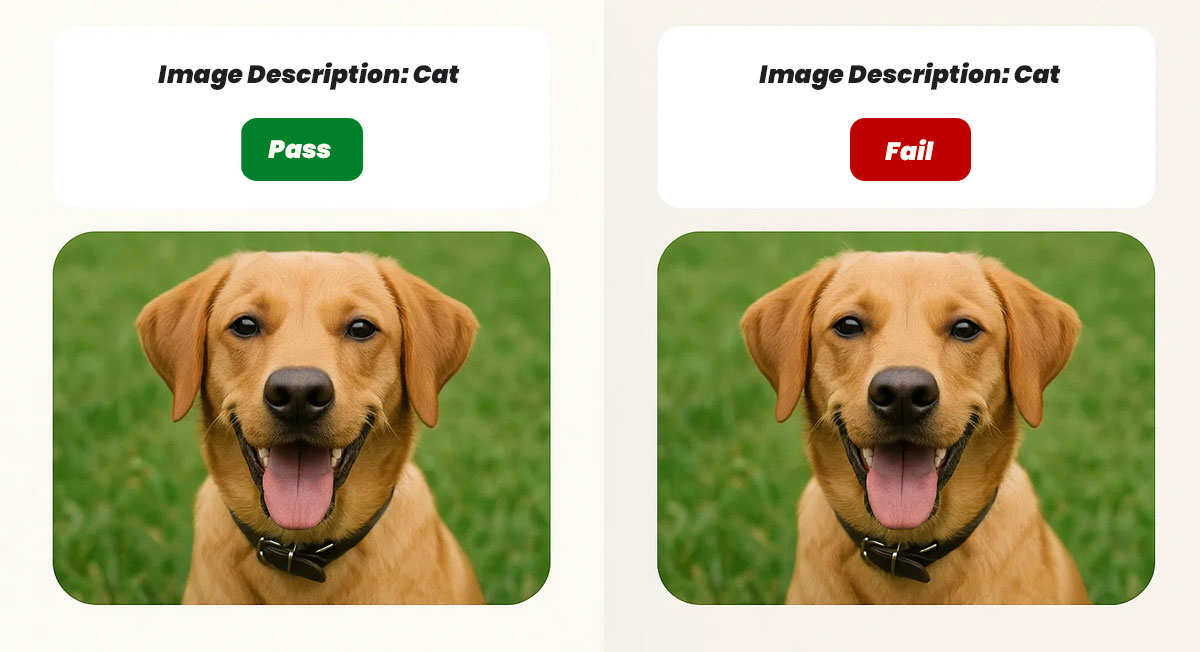
- The Tool Sees: An image with a text description. It passes the test.
- The Human Sees: A picture of a dog, but the description says "cat."
Automated tools can verify that a form label exists, but they cannot judge if the label makes sense to a user. They can check colour contrast math, but they cannot determine if you are using colour alone to convey critical status updates. They confirm code syntax, but cannot tell you if the interaction feels broken to a screen reader user.
Strategic Knowledge: The True Value Add
This is where expert manual testing and strategic knowledge come into play. The best practice is to perform manual testing to understand the real issues, using automation primarily to track progress.
True accessibility for your product means going beyond the "pass/fail" binary of a tool. It requires a team that understands:
- Context: Recognising why a specific criterion matters to your specific users.
- Remediation: Knowing how to fix an issue correctly, rather than just writing code that silences the warning.
- Design: Creating accessible patterns from the start so you aren't paying to retrofit fixes later.
For example, when a tool flags a generic "Click Here" link, the fix is not just a technical tweak. It involves understanding that users navigating via a list of links need descriptive text, and rewriting the content to say "View our Services" instead, or recognising the need to add additional or better structure to the overall context.
Building for Everyone
Effective accessibility is not a feature you add at the end; it is how you build. We recommend a strategy that leverages the best of both worlds. We use robust automated tools - running at least two distinct engines to maximise coverage, as recommended by GDS - to catch syntax errors and regressions. But we pair that with manual auditing, keyboard testing, and screen reader validation.
The tools show us what failed. Our expertise tells you why it matters and how to fix it.
At Element78, we believe accessibility is a strategic advantage, not just a technical requirement. We help teams understand not only what to fix, but why it matters, ensuring long-term quality rather than short-term patchwork.